enso is a program to help manipulate abstract puzzle designs into physical puzzles.
In other words it will help automate the conversion of xmpuzzle files into SCAD files for 3D Printing.
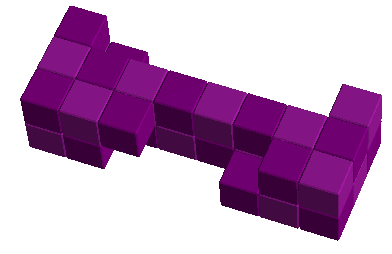
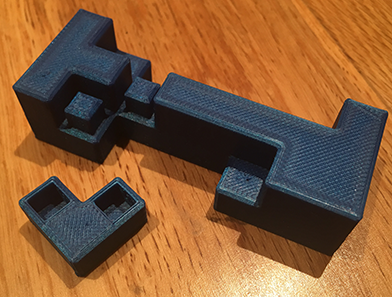
| before | after |
|---|---|
 |  |
enso will read in puzzle definitions from Andreas Röver's Burr Tools in the xmpuzzle format.
enso will then automatically convert the shapes into puzzlecad format, and if necessary rotate and/or cut each shape into smaller shapes with snap-joints, so that it can be printed with minimal or zero support material.
enso will output OpenSCAD files which reference Aaron Siegel's excellent Puzzlecad library to do the final rendering as an STL.
Where does enso fit into my puzzle printing workflow?

Downloads:
| Windows | zip | 90K |
|---|---|---|
| Linux / macOS | tar.gz | 90K |
| Executable JAR | jar | 94K |
| Source Code (GPLv3) | zip | 104K |
Pre-Requisites:
You need at least a Java 8 Runtime or higher, try running 'java -version' to see if it is installed already.
for example you can install either Windows OpenJDK 11 (Corretto) or Mac/Linux Java Runtimes or from packages in your operating system.
Download the puzzlecad.scad file from inside the zip at Puzzlecad
Install OpenSCAD if you don't already have it
Installation:
Download the enso zip or tar.gz file
Unpack the file to a folder on your computer (e.g. "C:\enso\" on Windows or ~/bin/enso/ on Linux)
Add the bin folder to your system path (e.g. PATH=%PATH%;C:\enso\enso-1.0.2\bin) or just run enso directly (e.g. using an alias or soft link)
Verify it is installed correctly, by typing
enso --helpWindows 10 setup:
In the cortana search box type ‘system env’ and hit return
It should bring up ‘system properties’
Click ‘environment variables’ button at the bottom
Then in the bottom window you should see a number of variables in a list
Double click ‘Path’
Double click the first available slot
And type in something like ...
C:\enso\enso-1.0.2\bin
(Depending on where you unzipped it)
Then click ok
And ‘ok’
And ‘ok’
You can then open windows command prompt
E.g type ‘cmd’ in cortana search
Then type ‘enso’
Hopefully you see the options
Example Usage:
$ enso Chronos.xmpuzzle
    saves the 'Chronos' puzzle file as multiple CAD files
    (one per shape) in the current folder with default options.
$ enso -S4.0 Chronos.xmpuzzle
    saves each file with small 4.0mm voxel size
$ enso --single Chronos.xmpuzzle
    saves as one CAD file with all shapes in the same file
$ enso -r7,9 Chronos.xmpuzzle
    saves CAD files but it does not try and
    rotate pieces 7 or 9, even if they would print better
$ enso -o Rayner Chronos.xmpuzzle
    saves CAD files with different prefix to
    the source file (e.g. Rayner-P1-S02.scad)
$ enso --help
    shows you all the options available, including advanced
    features not mentioned on this webpage.
How to use the 'scad' files this program outputs:
- Make sure openscad is in your PATH
- Make sure you have a copy of puzzlecad.scad (see above) in the same folder as your generated scad files
$ openscad -o Chronos.stl Chronos-all-P1.scad
    This will convert your scad file into an STL file,
    ready for opening in your 3d printer software.
To convert multiple scad files at the same time in Windows, you can run this at the Command Prompt:
FOR %%f in (*.scad) DO openscad.com -o "%%~nf.stl" "%%f"To convert multiple scad files at the same time in Linux or MacOS you can do the following:
$ for f in *.scad; do openscad -o ${f%.scad}.stl $f; doneNews
| 28 Apr 2019 | Version 1.0.2 released - minor improvements
|
| 22 Apr 2019 | Version 1.0.1 released - minor improvement
|
| 21 Apr 2019 | Version 1.0.0 released |
Source code
The source code for enso is licensed under the GPLv3 which means you are free to use it under those terms. The latest source code is available at github.com/jeremyrayner/enso
Authors
Jeremy Rayner - Initial work - @j6wbs
License
This project is licensed under the GNU GPLv3 License - see the GPLv3 License for details
Acknowledgments
Thanks to Andreas Röver for the amazing Burr Tools
Thanks to Aaron Siegel for creating the wonderful Puzzlecad, which you can read more about here
Thanks also to Richard Gain and Derek Bosch for their help and inspiration in 3D printing.
Thanks to Alfons Eyckmans, Brian Menold and Guy Brette for making my puzzle designs in wood.
Everyone at the Camden Puzzle Party and Midlands Puzzle Party, for their warm welcome and fun times.
Everyone at the Puzzle Photography and Puzzle Friends groups on Facebook.
Thanks to Clair and Charlie for their indefatigable support and enthusiasm.
Have fun!
Please email any questions about enso to 